Evaluating the Winter Carousel 3D Shadow Box Template
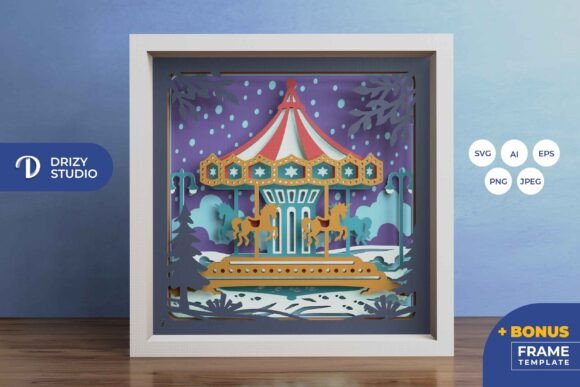
For crafters and DIY enthusiasts looking to add depth and dimension to their seasonal decor, the Winter Carousel 3D Shadow Box - Carousel represents a sophisticated approach to paper art. Unlike traditional flat prints or simple cutouts, this project utilizes a layered construction technique to create a tangible sense of perspective. The design features a classic carousel motif set against a winter backdrop, achieved through seven distinct layers of paper cutting. This article evaluates the capabilities, requirements, and potential applications of this specific template to help you determine if it aligns with your crafting goals.
Understanding the Product Format and Specifications
The core of this project is a digital template designed for precision cutting. When you acquire the Winter Carousel 3D Shadow Box - Carousel, you are receiving a suite of file formats intended to maximize compatibility with various tools. The package typically includes AI, EPS, PNG, SVG, and JPEG files. The inclusion of vector formats like SVG, AI, and EPS is particularly significant for users who own electronic cutting machines such as Silhouette or Cricut. These files allow the machine to read the paths accurately, ensuring clean cuts for the intricate details found in a multi-layered design.
The template is structured as a square composition, with standard digital dimensions of 714 x 714 pixels for the vector and raster working files, and a high-resolution JPEG preview at 3000 x 2000 pixels. Physically, the design is optimized for a frame size of 20.32 cm by 20.32 cm (approximately 8 inches by 8 inches). It is important to note that while SVG files can be resized to fit different frame dimensions, the aspect ratio must remain constant to prevent distortion of the carousel figures and background elements. The design consists of seven separate layers, which is a moderate count that offers substantial depth without becoming unmanageably thick for standard shadow box frames.
Crafting Methods: Machine Cutting vs. Hand Cutting
One of the primary considerations when selecting this template is your preferred method of execution. The Winter Carousel 3D Shadow Box - Carousel is versatile enough to accommodate both automated and manual crafting techniques.
For those with access to die-cutting machines, the SVG file provides a streamlined workflow. The machine handles the complexity of the inner cuts and delicate bridges between paper sections, which can be tedious to replicate by hand. This method ensures uniformity across all seven layers, which is crucial for the final alignment of the 3D effect.
However, ownership of a cutting machine is not a prerequisite. The template is equally viable for manual crafting using an art knife (such as an X-Acto knife) and scissors. For hand-cutters, the PNG or high-contrast JPEG files can serve as visual guides, or the SVG can be printed directly onto cardstock. While this approach requires more time and a steady hand, it offers a tactile connection to the artwork. The trade-off is that manual cutting may introduce slight variances in line thickness, though these often add a unique, handmade charm to the final piece.
Assembly and Display Options
The assembly process transforms the flat sheets into a three-dimensional scene. To construct the Winter Carousel 3D Shadow Box - Carousel, you will need adhesive materials such as glue dots, double-sided tape, or foam mounting squares. Foam squares are generally recommended over liquid glue, as they provide consistent spacing between the layers, enhancing the shadow effect and preventing the paper from warping due to moisture.
Once assembled, the display possibilities are twofold. The most traditional application is as a framed wall decoration. The layered paper creates natural shadows that shift depending on the ambient lighting in the room, giving the carousel a dynamic appearance even when static. Alternatively, the design is well-suited for conversion into a lightbox. By inserting LED strip lights between the layers during assembly, the paper acts as a diffuser, illuminating the winter scene from within. This backlighting technique highlights the translucency of the paper and accentuates the silhouettes of the carousel horses and winter elements, creating a glowing centerpiece ideal for evening displays.
Ideal Use Cases and Audience Fit
This template is a strong fit for several specific scenarios. First, it is an excellent choice for intermediate crafters who have mastered basic cutting techniques and are ready to explore spatial design. The seven-layer structure provides enough complexity to be engaging without being overwhelming.
Secondly, it serves as a thoughtful option for gift-giving. A handmade Winter Carousel 3D Shadow Box - Carousel demonstrates significant effort and personalization, making it suitable for friends, family, or partners during the holiday season. The universal appeal of carousels and winter imagery ensures it fits well in various home decor styles, from rustic to modern.
Additionally, this project is valuable for those interested in learning the mechanics of papercraft layering. It provides a practical case study in how foreground, midground, and background elements interact to create depth perception.
Considerations and Potential Limitations
While the project offers many benefits, there are practical limitations to consider before beginning. The most critical factor is frame depth. Standard picture frames often lack the internal depth required to house seven layers of cardstock plus the necessary spacing material. Crafters must ensure they source a "shadow box" frame with adequate depth (typically 1 inch or more) to accommodate the build without crushing the paper or forcing the glass against the top layer.
Paper selection is another variable that impacts the final result. The template files are digital; the physical outcome depends entirely on the weight, texture, and color of the paper you choose. Heavier cardstock holds its shape better but may be harder to cut manually, while lighter paper may buckle under the weight of multiple layers if not supported correctly. Furthermore, as noted in the product details, the final color may vary slightly from the digital preview due to differences in monitor calibration, printer ink, and the specific hue of the cardstock used.
Finally, time investment should be weighed against deadlines. If opting for hand-cutting, a seven-layer design with intricate carousel details can require several hours of focused work. Those seeking a quick, same-day craft project might find the time commitment prohibitive compared to simpler, single-layer templates.
Making the Decision
Deciding whether to proceed with the Winter Carousel 3D Shadow Box - Carousel comes down to your available tools, patience, and desired outcome. If you possess a cutting machine and have access to deep frames, this template offers a high-reward project with professional-looking results. If you prefer hand-crafting, ensure you have sharp blades and ample time to dedicate to the finer details.
Ultimately, this template bridges the gap between digital convenience and analog artistry. It provides the structural blueprint for a complex scene while leaving the material choices and finishing touches in your hands. Whether displayed as a sunlit wall piece or an illuminated nightlight, the layered construction offers a timeless aesthetic that elevates standard paper crafting into a dimensional art form.