Creating Unforgettable Moments: The Ultimate Guide to 3D Birthday Boxes with Digital Cut Files
Celebrating a birthday is about more than just marking another year; it is an opportunity to make someone feel truly seen, valued, and special. In an era where mass-produced gifts often lack a personal touch, the trend of handmade paper crafts has surged in popularity. Among these creations, the 3D Birthday Box stands out as a unique fusion of artistry, engineering, and heartfelt sentiment. Whether you are a seasoned crafter or a beginner looking to create something extraordinary, utilizing a digital download file for a 3D Birthday Paper Box with a bow offers the perfect solution to craft a memorable gift.
This guide explores the world of 3D paper boxes, explaining how digital templates work, why they are significant in modern gifting, and how you can use them with cutting machines like Cricut to bring your creative vision to life.
What is a 3D Birthday Box?
At its core, a 3D Birthday Box is a structural paper craft designed to hold small gifts, treats, or simply serve as a decorative centerpiece. Unlike traditional flat greeting cards or standard gift bags, these boxes possess depth and dimension. They are engineered from a single sheet or multiple coordinated sheets of cardstock, folded and assembled to create a sturdy container.
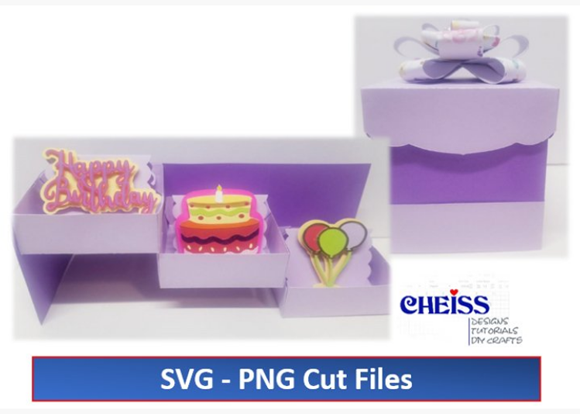
The specific design discussed here includes layered elements such as "Happy Birthday" text, cakes, and balloons, topped with an intricately cut bow. This combination transforms a simple container into a storytelling piece. The box becomes a vessel not just for physical items, but for the theme of the celebration itself. When crafted correctly using high-quality materials like 65-pound cardstock, the result is a professional-looking item that rivals store-bought luxury packaging.
The Role of Digital Download Files in Modern Crafting
Gone are the days when creating complex 3D structures required advanced drafting skills or hours of manual measuring and drawing. The advent of SVG and PNG cut files has revolutionized the crafting industry. A digital download file serves as the blueprint for your project. When you purchase or download a zip folder containing these files, you are acquiring a precise map that tells your cutting machine exactly where to cut, score, and slice.
These files typically include:
- SVG Files: Scalable Vector Graphics that allow cutting machines to read paths for clean, sharp cuts regardless of the size you choose.
- PNG Files: High-resolution images useful for printing designs onto colored cardstock before cutting, or for use in digital planning.
- Layered Designs: Separate files for the box base, the decorative layers (cake, balloons), and the bow, allowing for customization of colors and materials.
- Instructions: Step-by-step guides, often including video links, to ensure successful assembly.
This digital approach democratizes creativity. It allows individuals without an background in graphic design to produce intricate, multi-layered projects with professional precision.
Why Choose a 3D Box Over Traditional Packaging?
In the context of modern life and business, the significance of presentation cannot be overstated. For small business owners selling handmade goods, for teachers creating rewards for students, or for friends wanting to elevate a birthday surprise, the 3D Birthday Paper Box offers distinct advantages.
1. The Element of Surprise and Delight
A flat card is expected; a 3D box is an experience. The tactile nature of opening a structured box, seeing the layered "Happy Birthday" design pop out, and discovering the bow on top creates a moment of delight. This emotional connection is the primary goal of effective gifting.
2. Customization and Personalization
Because you are working with digital files and your own choice of materials, no two boxes need to look the same. You can match the box to the birthday person's favorite colors, hobbies, or party theme. If they love blue and silver, you use those tones. If the theme is "vintage," you can select textured kraft paper. This level of personalization is impossible with generic store-bought options.
3. Cost-Effectiveness and Sustainability
Creating your own packaging is often more economical than buying pre-made luxury boxes, especially when making multiples for a party favor or small business orders. Furthermore, using paper—a biodegradable and recyclable material—aligns with growing environmental consciousness. By using 65-pound cardstock, you ensure durability without relying on plastic components.
Tools and Materials: Setting Up for Success
To transform a digital file into a physical masterpiece, you need the right tools. While the design does the heavy lifting regarding aesthetics, your execution determines the quality.
- Cutting Machine: Devices like the Cricut Explore, Cricut Maker, Silhouette Cameo, or Brother ScanNCut are ideal. These machines read the SVG files to execute precise cuts.
- Cardstock (65 lbs): As referenced in the design specifications, 65-pound cardstock is the gold standard for this project. It is thick enough to hold the 3D structure without collapsing but thin enough to fold cleanly without cracking. Lighter paper may result in a flimsy box, while heavier board may be difficult for standard home machines to cut.
- Adhesives: Strong glue tabs, double-sided tape, or liquid craft glue are essential for assembling the box and attaching the layered decorations.
- Weeding Tools: Small tweezers or picks help remove the tiny excess paper from intricate parts of the bow and balloon designs.
Understanding the Design Components
The specific design package mentioned includes three critical elements that work in harmony:
- The 3D Box Cutting Template: This is the structural foundation. It includes score lines (dashed lines) that indicate where to fold and solid lines for cutting. Proper scoring is vital for crisp edges.
- Layered Decorations: The "Happy Birthday," cake, and balloon elements are designed to be adhered to the front or sides of the box. Because they are layered, they add depth. For instance, a yellow cake layer might sit atop a brown layer, which sits atop the box wall, creating a shadow effect.
- The Bow Template: A bow adds a finish of elegance. The digital file ensures the loops and tails of the bow are symmetrical, a task that is notoriously difficult to achieve by hand.
Step-by-Step: From Digital File to Finished Gift
The process of creating these boxes is logical and rewarding. Here is a general workflow based on the provided digital assets:
Step 1: Preparation
Download the zip folder and extract the files. Open the SVG file in your machine's software (e.g., Cricut Design Space). Review the instructions included in the folder. Select your colors in the software to match your physical cardstock.
Step 2: Cutting
Load your 65-pound cardstock onto a standard grip mat. Send the design to your machine. Ensure the machine settings are adjusted for cardstock to prevent tearing. The machine will cut the box template, the decorative layers, and the bow pieces.
Step 3: Weeding and Scoring
Remove the excess paper (weeding). If your machine did not score the fold lines automatically, use a bone folder and a ruler to gently crease along the dashed lines indicated in the design. This step is crucial for the 3D geometry to hold its shape.
Step 4: Assembly
Follow the step-by-step instruction link provided in your download. Generally, you will fold the box along the score lines, apply adhesive to the tabs, and secure the box shape. Next, assemble the bow by folding and gluing the center strip. Finally, adhere the "Happy Birthday," cake, and balloon layers to the box face, ensuring they are centered and straight.
Step 5: Final Touches
Attach the bow to the top or front of the box. Insert your gift, treat, or gift card. The result is a stunning, custom-made presentation.
Common Misunderstandings and Tips
Beginners often assume that digital files guarantee a perfect result instantly. However, material choice plays a massive role. Using paper that is too thin will result in a box that cannot support the weight of the layered decorations. Conversely, paper that is too thick may not fold neatly at the corners. Sticking to the recommended 65-pound cardstock is the safest bet for success.
Another common assumption is that all cutting machines work exactly the same. While SVG is a universal format, pressure settings and blade depths vary between brands and models. Always perform a test cut on a small scrap of your chosen paper before committing to the full design.
The Broader Impact of DIY Craftsmanship
Beyond the immediate joy of giving a gift, engaging with 3D paper crafts fosters creativity and patience. In educational settings, these projects teach geometry, spatial reasoning, and fine motor skills. For adults, it offers a therapeutic break from screens, allowing for tangible creation. In the business world, artisans use these techniques to build brands centered on quality and care.
The availability of high-quality digital download files bridges the gap between imagination and reality. It empowers anyone to become a designer, proving that with the right tools and a little guidance, you can create something that makes people feel truly special on their birthday.
In conclusion, the 3D Birthday Box with Bow is more than just a container; it is a statement of effort and love. By leveraging modern technology like SVG files and Cricut machines, combined with traditional craftsmanship, you can produce gifts that leave a lasting impression. Whether for a child's party, a milestone anniversary, or a corporate gesture, these boxes remind us that the most valuable gifts are often the ones we make with our own hands.